- An AI receptionist answers with conversational AI; an answering service uses real people, usually in a shared call center.
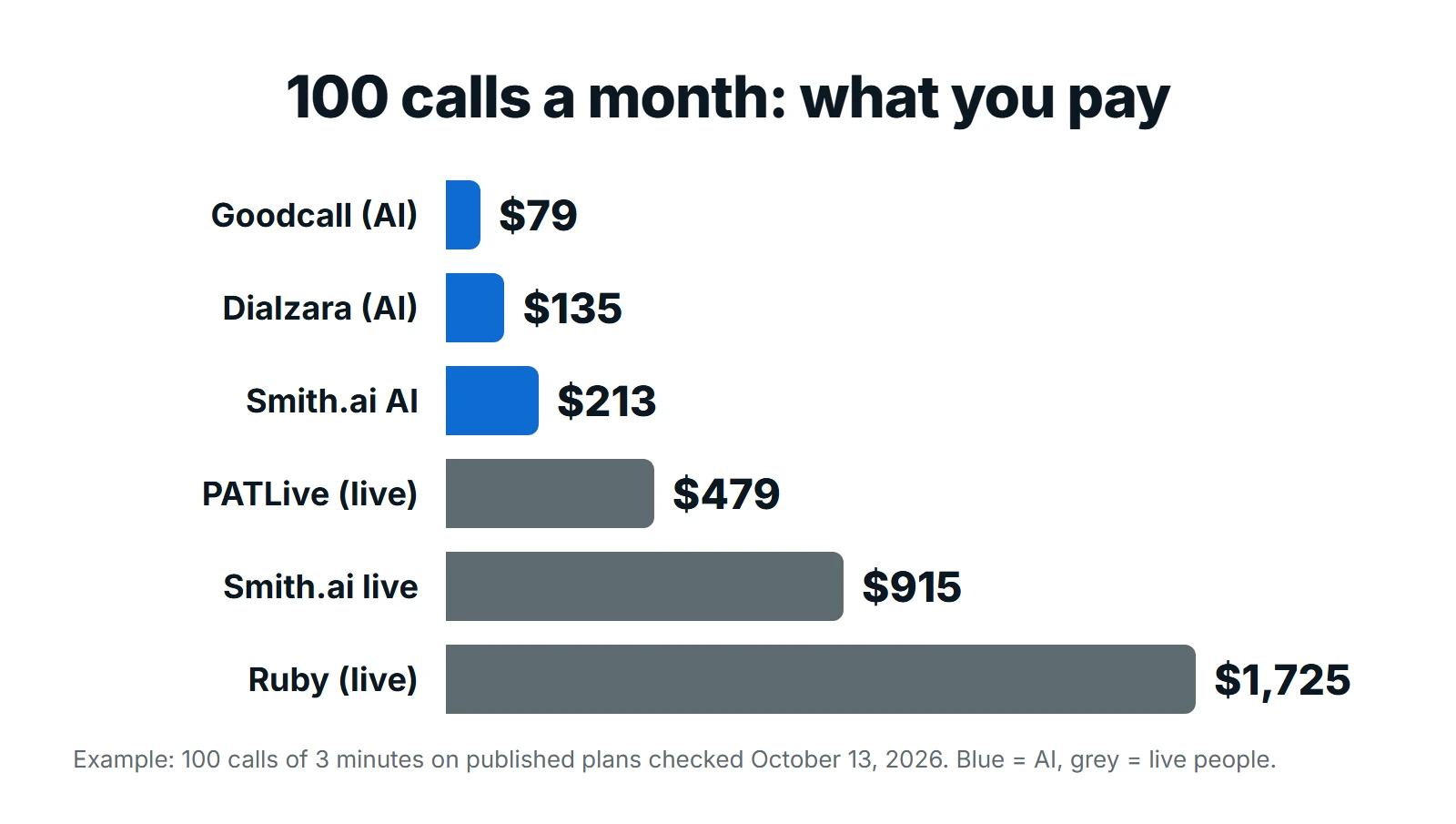
- On published plans, 100 calls a month cost $79 to $213 with AI and $479 to $1,725 with a live answering service.
- AI wins on cost, booking and routine questions. People win on empathy, judgment and complicated calls.
- Many businesses get the best of both with a hybrid setup: AI answers first and hands urgent or sensitive calls to a person.
The short answer: in the AI receptionist vs answering service decision, an AI receptionist is the better choice when most of your calls are routine questions, bookings and after-hours enquiries, because it costs a fraction of a live answering service and can book straight into your calendar. A live answering service is the better choice when callers are often upset, calls need judgment, or every caller expects a human. For many small businesses, the best answer is both: AI first, with a clear handoff to a person.
What Is the Difference?
Both options answer your business phone when you cannot. The difference is who, or what, picks up.
- AI receptionist: a voice assistant powered by conversational AI. It answers questions from information you approve, collects caller details, books appointments and sends your team a summary. Most plans are priced per minute, per call or per unique caller.
- Answering service: a team of human receptionists, usually working from a shared call center for many businesses. They follow your script, take messages, transfer calls and can often book appointments. Plans are priced per minute or per call, and a human minute costs far more than an AI minute.
- Virtual receptionist: a term used for both. Some providers use it for live remote receptionists, others for AI. Always check which one you are buying.
Which Is Best for Which Calls?
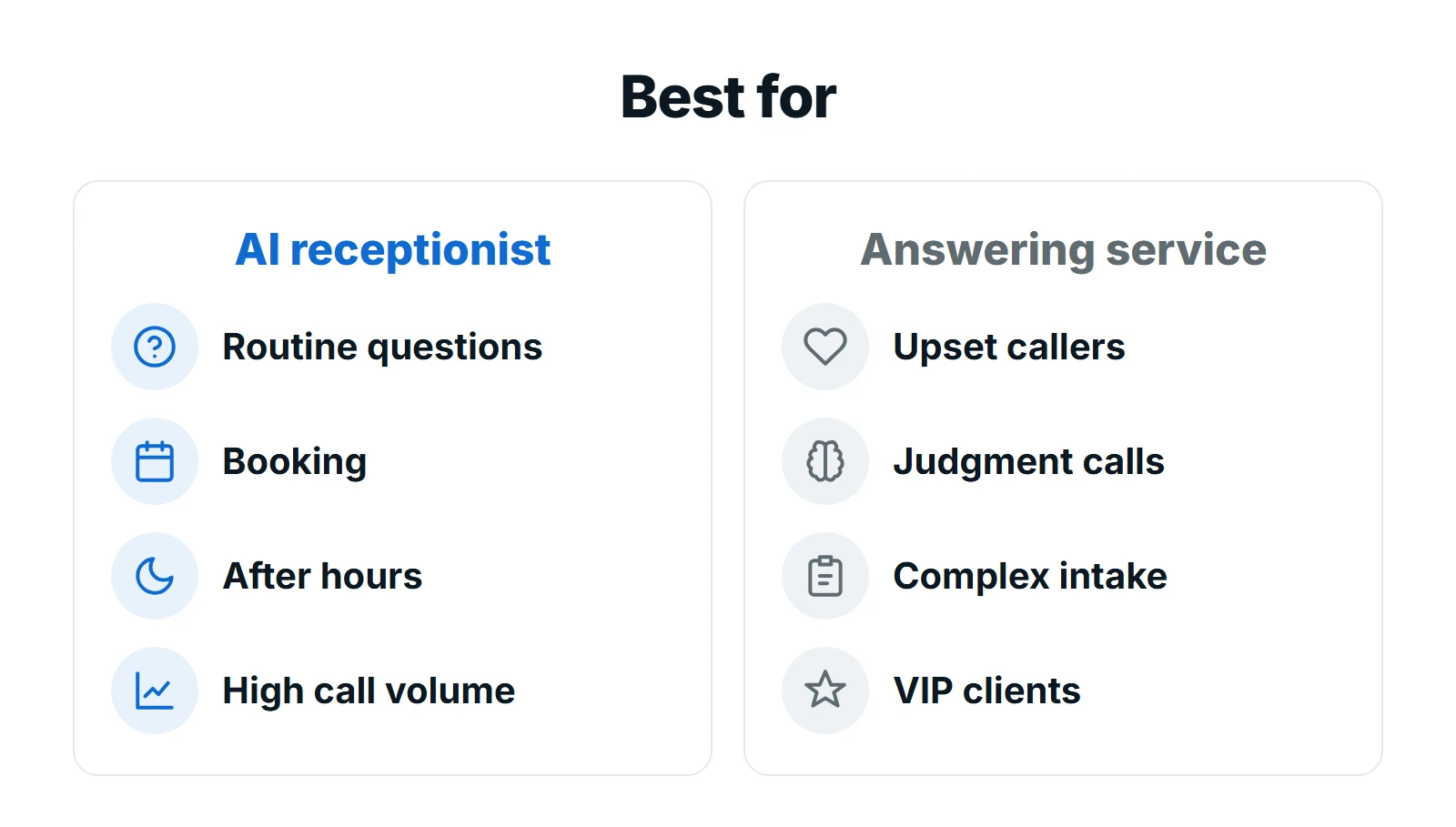
The split is simple once you look at the calls you actually receive. An AI receptionist is consistent and fast with repeatable work: opening hours, prices, service areas, availability and booking. People are better at reading emotion, handling the unexpected and deciding when to bend the rules.
Cost: AI Receptionist vs Answering Service
Here is the same month priced on each provider’s published plans: 100 calls averaging three minutes, or 300 minutes in total. Prices were checked on October 13, 2026.
| Provider | Type | How it adds up | Monthly cost |
|---|---|---|---|
| Goodcall Starter | AI | $79 plan, up to 100 unique callers | $79 |
| Dialzara Business Pro | AI | $99 for 220 minutes + 80 minutes at $0.45 | $135 |
| Smith.ai AI Receptionist Pro | AI | $150 for 75 calls + 25 calls at $2.50 | $212.50 |
| PATLive 300 minute plan | Live | $479 for 300 minutes | $479 |
| Smith.ai Basic (live) | Live | $810 for 90 calls + 10 calls at $10.50 | $915 |
| Ruby 500 minute plan | Live | smallest published plan covering 300 minutes | $1,725 |
The cheapest live option in this example, PATLive‘s 300 minute plan at $479, still costs more than twice the most expensive AI option. Live plans also charge for extras on top: Smith.ai adds $1.50 a call for appointment booking and $1.00 a call for a Spanish line on its live plans, while Ruby starts at $250 a month for just 50 minutes.
For a full breakdown of AI plans, see our guide to how much an AI receptionist costs.
Side by Side Comparison
| AI receptionist | Answering service | |
|---|---|---|
| Typical cost for 100 calls | $79 to $213 a month | $479 to $1,725 a month |
| Hours | 24/7, every day | Usually 24/7 on most plans |
| Knowledge of your business | Answers from your approved information | Follows your script |
| Appointment booking | Books into your calendar | Often available, sometimes an extra fee |
| Upset or emotional callers | Limited: should hand off | Strong: trained people |
| Unusual requests | Follows rules, can miss nuance | Can use judgment |
| Summaries and CRM | Automatic after every call | Messages, varies by provider |
| Setup | Self-serve, or done for you | Script and onboarding |
When an AI Receptionist Is the Better Choice
- You miss calls during jobs, lunch breaks, evenings or weekends, and most of them are routine.
- Callers ask the same questions about prices, hours, service areas and availability.
- You want bookings to land straight in your calendar and every lead logged with a summary.
- Call volume is high or spiky, and a per-minute human service would get expensive.
- You want the same accurate answer every time, from information you control.
When an Answering Service Is the Better Choice
- Many callers are upset, anxious or in a difficult situation and need reassurance.
- Calls often need judgment, such as deciding what counts as urgent or making exceptions.
- You run detailed intake, for example in legal or healthcare work, where nuance matters.
- Your clients expect a human voice every time, and the price difference is easy to justify.
- You receive few calls, and a small live plan covers them comfortably.
The Hybrid Option: AI First, People When It Matters
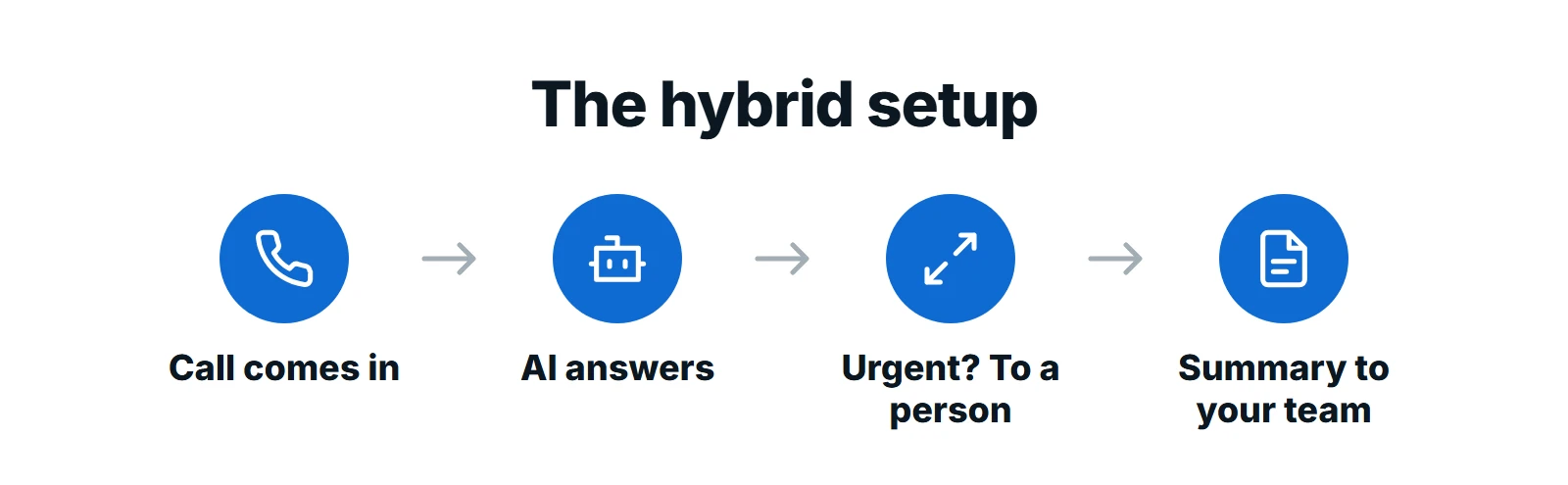
You do not have to choose one or the other. In a hybrid setup, the AI receptionist answers every call and handles the routine ones itself. Calls that match your rules, such as emergencies, complaints or existing clients, are transferred to a person on your team or to a live service. Every conversation ends with a summary, so nothing gets lost.
This keeps costs close to an AI plan while protecting the calls that matter most. The key is designing the handoff rules carefully and testing them with real scenarios before launch.
Want a hybrid receptionist built around your calls?
We set up AI receptionists that answer, book and summarise every call, with clear rules for when a person takes over. You get a fixed quote before any work starts.
How to Set Up a Hybrid Receptionist
A hybrid setup works when the rules are clear. Here is the order we follow when we build one:
- Sort your calls. Pull a month of call logs and group calls into routine (hours, prices, booking), sensitive (complaints, emergencies, existing clients) and other.
- Write the approved answers. List the questions the AI may answer and the exact information it can share: services, prices, service areas, hours and booking rules.
- Set the handoff rules. Decide which calls go straight to a person, who receives them at each time of day, and what happens when nobody is available, such as a callback request.
- Connect your calendar and CRM. Bookings should land in your calendar and every caller should be logged with a summary, so your team never asks the same questions twice.
- Test with real scenarios. Call it yourself as an easy customer, a confused one and an upset one. Check that every handoff reaches the right person.
- Review every month. Read the summaries, look for questions the AI could not answer and add them to its approved information.
Mistakes to avoid when you switch
- Hiding the AI. Greet callers as an AI assistant. Pretending to be a person damages trust the moment a caller notices.
- No way out. Every caller should be able to reach a person or leave a callback request.
- Letting it guess. If the AI does not have an approved answer, it should take details and promise a follow-up, not invent one.
- Switching everything at once. Start with after-hours or overflow calls, measure the results, then expand.
How to Decide in 5 Questions
- What share of your calls are routine questions or bookings?
- How often are callers upset, urgent or hard to help?
- How many minutes of calls do you get a month, and at what times?
- Do you need bookings in your calendar and leads in your CRM?
- What is one new customer worth to you, compared with the monthly price?
If most calls are routine, start with an AI receptionist and add a human handoff for the rest. If most calls are sensitive, a live answering service is worth the extra cost. You can connect either option to your systems with AI workflow automation or CRM and marketing automation.
Frequently Asked Questions
Is an AI receptionist better than an answering service?
It depends on your calls. An AI receptionist is better and much cheaper for routine questions, booking and after-hours calls. A live answering service is better for upset callers and calls that need judgment. Many businesses use AI first with a handoff to a person.
How much cheaper is an AI receptionist than an answering service?
On published plans for 100 three-minute calls a month, AI options cost $79 to $213, while live answering services cost $479 to $1,725. Depending on the providers you compare, AI can cost a quarter of the price or less.
Can an AI receptionist transfer calls to a person?
Yes, most can transfer calls using rules you set, such as emergencies, complaints or existing clients. Some providers limit transfers to higher plans, so check before you buy.
Will callers know they are talking to AI?
Modern AI voices sound natural, but you should be open about it. Many businesses greet callers as an AI assistant, which builds trust and sets expectations for when a person will follow up.
Is a virtual receptionist AI or a person?
It can be either. Some providers use virtual receptionist for remote human receptionists and others for AI. Check the plan details to see who actually answers your calls.
Final Thoughts
The AI receptionist vs answering service question is really about your calls. Routine, repeatable calls are where AI shines, at a fraction of the cost. Sensitive, complex calls still deserve a person. Most businesses do best with both, connected by clear rules.
At Digital Roots Media, we build AI receptionists that answer, book and summarise every call, and hand off to your team when it matters. Request a free proposal for a setup designed around your calls.