- Off-the-shelf software is faster and cheaper to start, and it is the right choice for standard processes such as accounting, email and basic CRM.
- Custom software fits your exact process, has no per-user fees and becomes an asset you own, but it costs more up front.
- Per-user fees add up: at $100 per user a month, a 20-person team pays $24,000 a year.
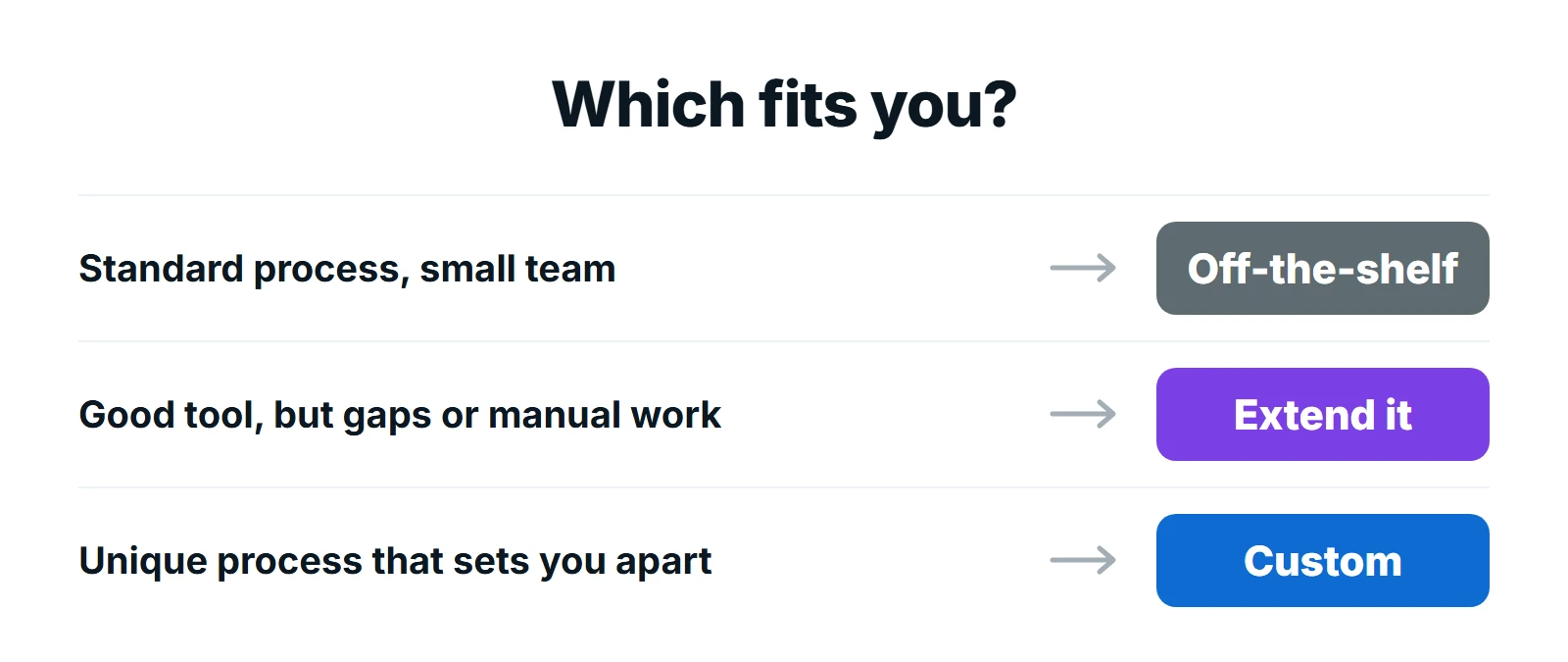
- Often the best answer is in the middle: keep a good off-the-shelf tool and extend it with custom integrations, dashboards or portals.
The short answer: in the custom software vs off-the-shelf decision, buy off-the-shelf software when your process is standard and a good product already does what you need. Build custom software when the process is unique to how you win customers, when you are paying for workarounds and manual work, or when per-user fees and missing features cost more each year than building would. Many businesses do both: buy the standard tools and build what connects them.
What Is the Difference?
- Off-the-shelf software is a ready-made product used by many businesses, usually sold as a monthly subscription (SaaS). Examples include CRMs, accounting tools and project management apps.
- Custom software is built for one business’s processes, users and data. It can be a web app, a customer portal, a dashboard or the integrations that connect your existing tools.
Side by Side
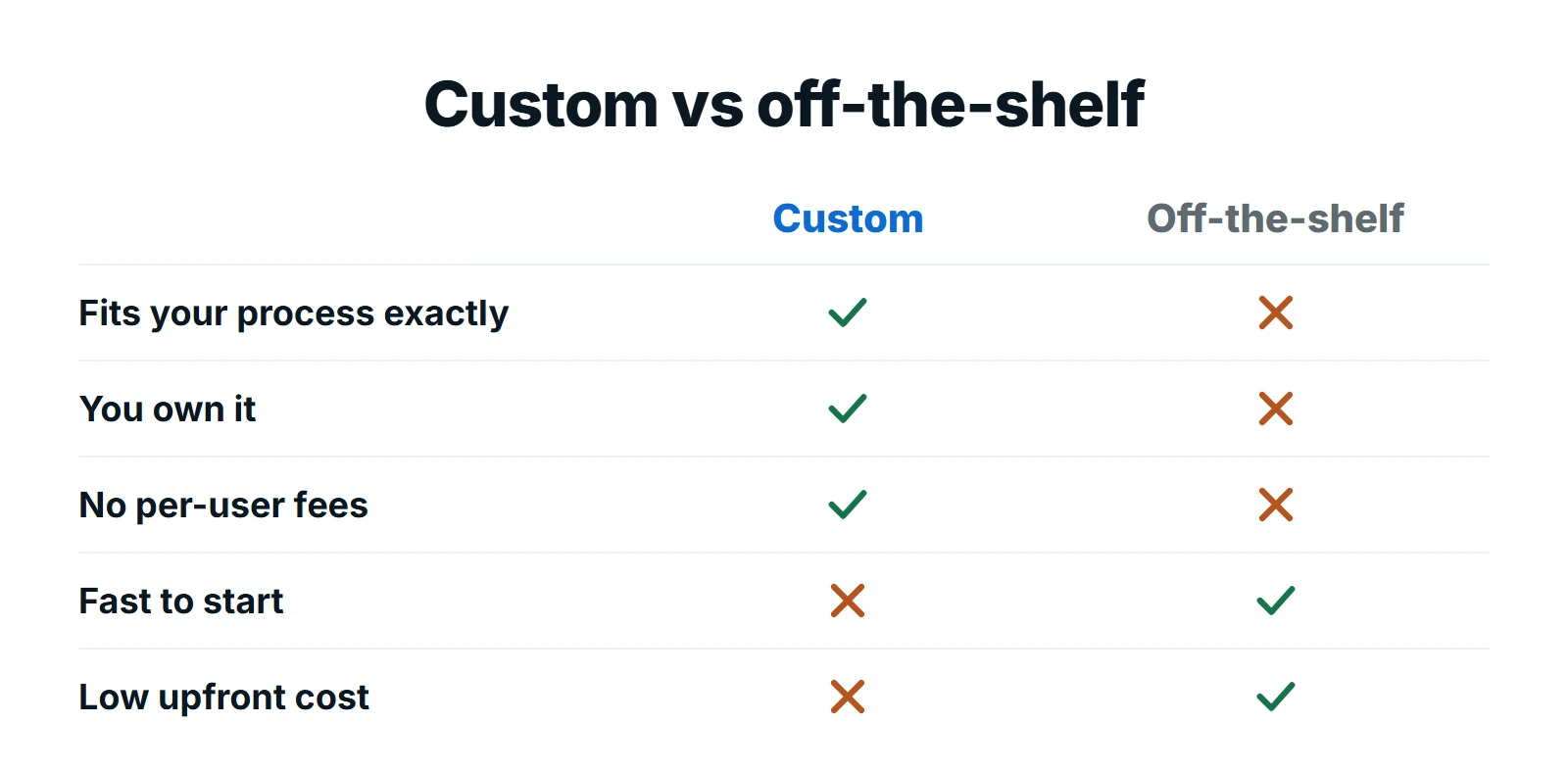
| Off-the-shelf | Custom software | |
|---|---|---|
| Time to start | Days | Weeks to months, built in stages |
| Upfront cost | Low: a subscription | Higher: a build project |
| Ongoing cost | Per user or per usage, every month | Hosting and maintenance |
| Fit to your process | You adapt to the software | The software adapts to you |
| Ownership | You rent it | You own the code and data |
| Updates | Vendor decides what changes | You decide what changes |
| Integrations | Whatever the vendor supports | Anything with an API |
| Competitive edge | Same tools as competitors | Can become a real advantage |
The Real Cost Comparison
Off-the-shelf looks cheaper because the first month is cheap. The full picture includes three costs that build up over time:
- Per-user fees. They grow with your team, every month, for as long as you use the product.
- Workarounds. Spreadsheets, copy-and-paste and double entry where the product does not fit your process. That is staff time, every week.
- Add-ons and integrations. Extra modules, higher tiers for one feature, and automation tools such as Zapier to connect everything.
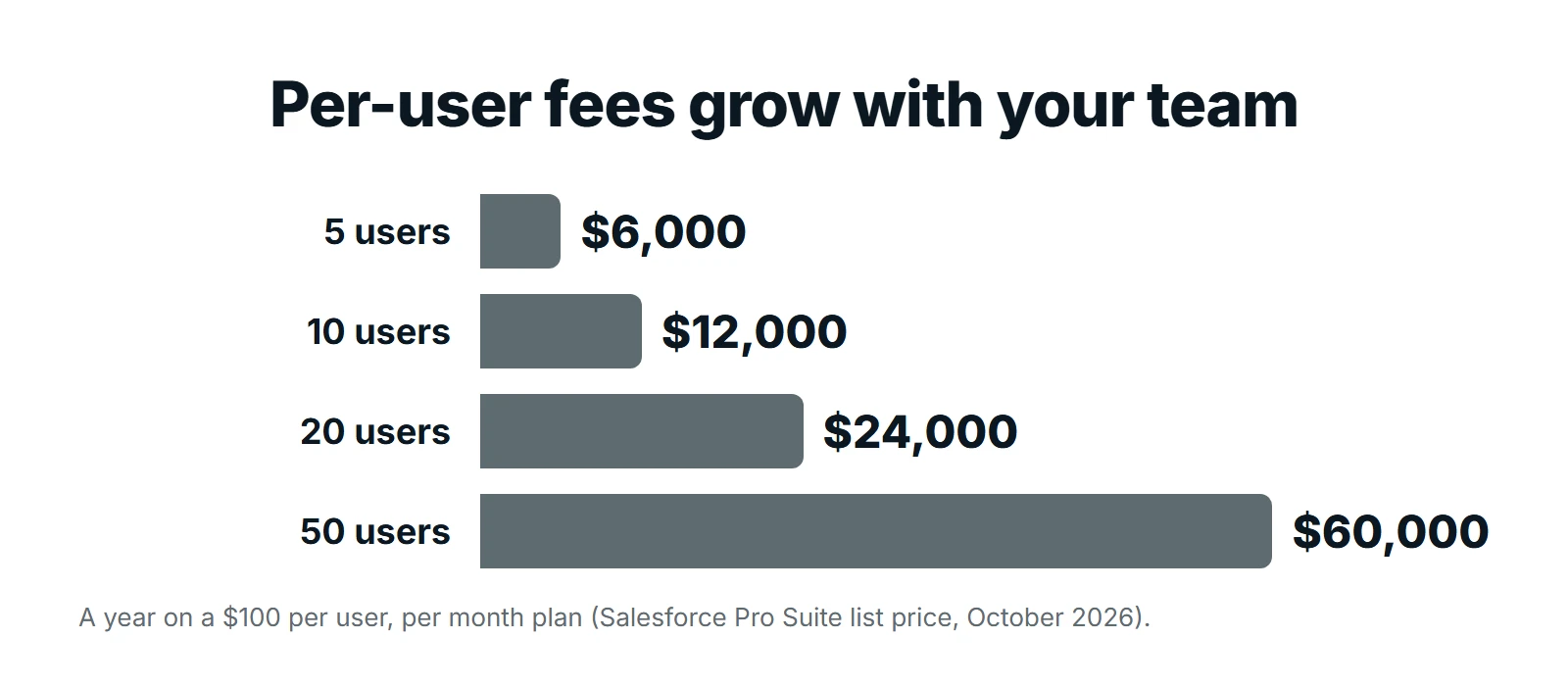
For example, Salesforce lists its Pro Suite at $100 per user a month, billed annually. That is $24,000 a year for a 20-person team, every year, before add-ons. That does not make it a bad choice. For many businesses it is excellent value. But it is the number to compare a custom build against, over three to five years rather than one.
Custom software has a higher upfront cost and ongoing hosting and maintenance, but no per-user fees, so the cost does not rise each time you hire. Get a fixed quote for the build and the yearly running costs, and compare the totals over the same period.
When Off-the-Shelf Is the Right Choice
- The process is standard: accounting, payroll, email, file storage, basic CRM.
- A well-known product does at least most of what you need without workarounds.
- You need it running this week, and the team is small.
- The software is not part of what makes customers choose you.
When Custom Software Is the Right Choice
- Your process is how you win customers, and no product supports it properly.
- Your team spends hours each week on spreadsheets, double entry or copying data between tools.
- Per-user fees, add-ons and workarounds already cost more each year than a build would.
- You need customers, partners or staff to log in to one place built around your service.
- You want to own the software and decide its roadmap, rather than depend on a vendor’s.
The Middle Path: Extend What You Have
You rarely have to replace everything. Most businesses get the best value by keeping good off-the-shelf tools and building around them:
- API integrations that connect your CRM, accounting, website and operations so data flows without re-typing.
- Custom dashboards that pull numbers from every tool into one live view.
- Customer portals that give clients one login for orders, documents and requests.
- Web applications for the one process no product handles well.
How to Lower the Risk of Building
The biggest worry about custom software is that it runs over budget or never quite works. These five habits keep a build small, predictable and useful:
- Start with one workflow. Build the single process that costs the most time or money, not the whole system at once.
- Write down what done looks like. Agree the screens, users, data and integrations before work starts, and get a fixed quote against that scope.
- Release in stages. Put a working first version in front of real users quickly, then improve it based on how they actually use it.
- Keep the standard tools. Connect to your accounting, email and CRM rather than rebuilding them.
- Own everything. Make sure the code, hosting accounts and data are in your name, with documentation, so you are never locked in to one developer.
Done this way, a custom build looks less like a gamble and more like a series of small, measurable improvements, each one paying for the next.
Not sure whether to build or buy?
We review your processes and tools, show you where off-the-shelf is enough and where custom software would pay off, and give you a fixed quote for anything we recommend building.
Questions to Ask Before You Decide
- Which tasks take the most manual time each week, and why?
- Does an existing product handle your process without workarounds?
- What will per-user fees, add-ons and integrations cost over three to five years?
- Is this process part of how you win or keep customers?
- Who needs access: staff only, or customers and partners too?
- What data do you need to own and control?
- Could you start small with an integration or dashboard before a full build?
If the question is mainly about connecting tools, our comparison of Zapier vs Make vs custom automation covers the lighter options.
Frequently Asked Questions
Is custom software better than off-the-shelf?
Neither is better in every case. Off-the-shelf is better for standard processes and fast starts. Custom software is better when your process is unique, when workarounds cost real time, or when per-user fees add up over the years.
Is custom software more expensive than off-the-shelf software?
Up front, yes. Over several years, not always. Off-the-shelf costs grow with users, add-ons and workarounds, while custom software has a build cost plus hosting and maintenance but no per-user fees. Compare totals over three to five years.
What is the build vs buy decision?
It is the choice between buying a ready-made product and building software for your needs. Most businesses buy for standard tasks and build where their process is unique or where tools need to be connected.
Can I customize off-the-shelf software instead of building?
Often, yes. Many products support custom fields, workflows and integrations. When that is not enough, custom integrations, dashboards or portals can extend the product without replacing it.
Who owns custom software?
Usually you do, if your contract says so. Make sure the agreement gives you ownership of the code, data and accounts, so you can host, change or hand over the software in future.
Final Thoughts
The custom software vs off-the-shelf question is not about which is better in general. It is about which parts of your business are standard and which are yours alone. Buy the standard, build what sets you apart, and connect the two so your team stops doing the work software should do.
At Digital Roots Media, we build custom software that fits how your business runs. Request a free proposal and we will tell you honestly whether to build, buy or extend.