Core Web Vitals are three measurements Google uses to judge real page experience: how fast the main content loads (LCP), how quickly the page responds to taps and clicks (INP), and how much the layout jumps around (CLS). A page passes when at least 75% of real visits meet the “good” threshold for all three. Google uses them as part of its page experience signals, so they matter for rankings, but they never outweigh relevant, helpful content.
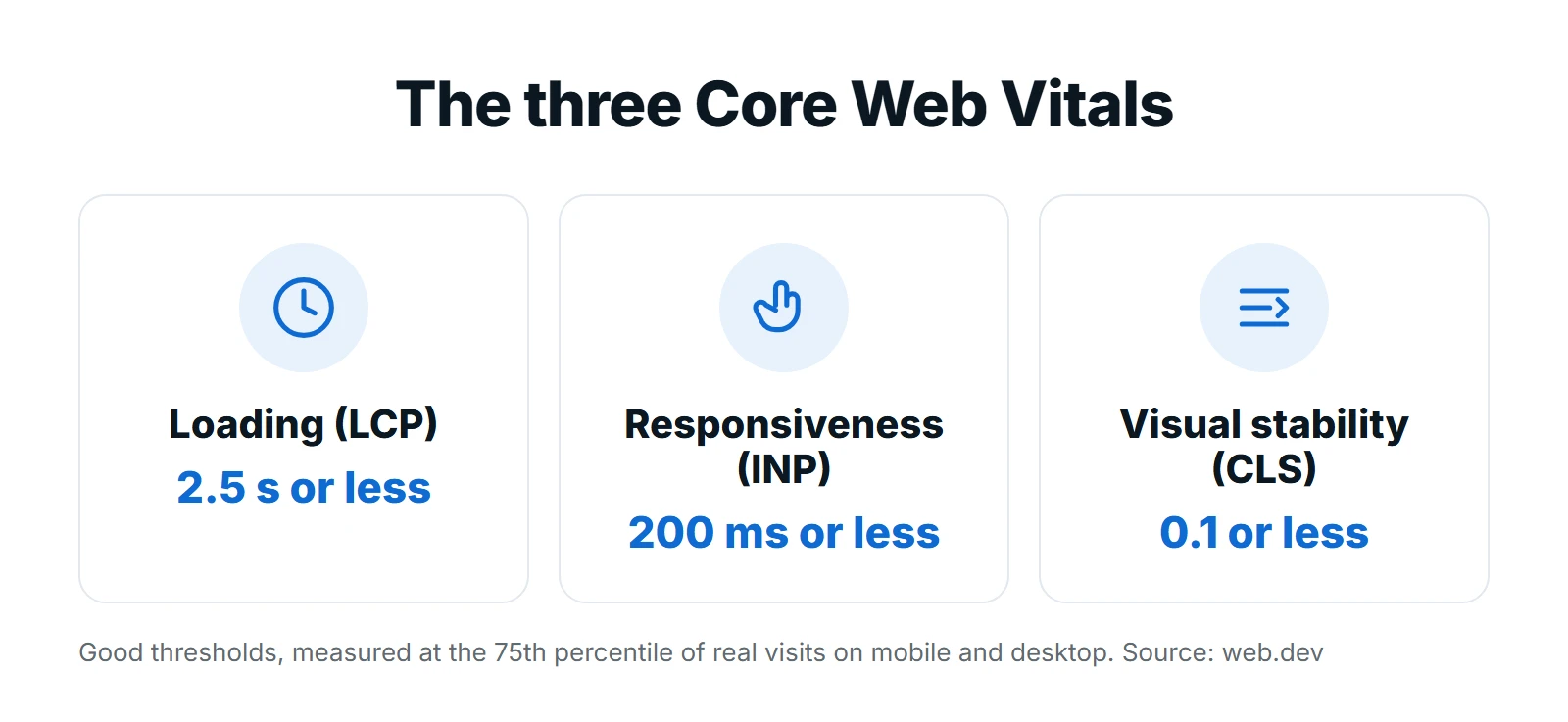
- Good thresholds: LCP 2.5 seconds or less, INP 200 milliseconds or less, CLS 0.1 or less.
- Google judges real user data from Chrome (the 75th percentile of visits), not a single lab test.
- INP replaced First Input Delay (FID) as a Core Web Vital on 12 March 2024.
- Most failures come from heavy images, render-blocking code and third-party scripts.
What Core Web Vitals measure
Google defines the current set of Core Web Vitals on web.dev. Each one covers a different part of the experience, and each has a clear target.
| Metric | What it measures | Good | Poor |
|---|---|---|---|
| Largest Contentful Paint (LCP) | When the largest image or text block in view finishes rendering | 2.5 s or less | Over 4 s |
| Interaction to Next Paint (INP) | How quickly the page responds to taps, clicks and key presses across the visit | 200 ms or less | Over 500 ms |
| Cumulative Layout Shift (CLS) | How much visible content moves unexpectedly while the page is used | 0.1 or less | Over 0.25 |
How Google decides whether you pass
Google looks at field data from the Chrome User Experience Report: anonymous measurements from real Chrome users over the previous 28 days. A URL, or a group of similar URLs, is rated good when the 75th percentile of visits meets the threshold. Mobile and desktop are judged separately, so a page can pass on desktop and fail on mobile.
What changed with INP
INP replaced First Input Delay as a Core Web Vital on 12 March 2024. FID only measured the delay before the browser started handling the first interaction. INP looks at every interaction during the visit and reports one of the slowest, so pages that feel sluggish after loading can no longer hide behind a fast first click. If an old guide or tool still talks about FID, it is out of date.
Do Core Web Vitals affect rankings?
Yes, but modestly. Google’s Core Web Vitals documentation says they are used by its ranking systems and recommends good scores for success in Search. Google is also clear that great page experience does not override relevance: a slower page that answers the search better can still outrank a faster one. Treat Core Web Vitals as a tie-breaker and, more importantly, as a conversion factor. Visitors who wait, mis-tap or lose their place leave, whatever your rankings are.
How to measure Core Web Vitals
- Search Console Core Web Vitals report: groups your URLs into good, needs improvement and poor using field data. Start here to see which page types fail.
- PageSpeed Insights: shows field data for a URL (when Chrome has enough visits) and a Lighthouse lab test with specific suggestions.
- Chrome DevTools Performance panel: shows live LCP, INP and CLS as you click around, which is the fastest way to find the interaction that hurts INP.
- The web-vitals JavaScript library: collects the metrics from your own visitors so you can send them to Google Analytics and see results by page and device.

A Lighthouse score of 100 does not mean you pass. Lighthouse runs one simulated load on one device and cannot measure INP, because nobody interacts with the page. Use it to find problems, then confirm the fix in field data, which takes up to 28 days to fully update.
How to improve LCP
LCP time breaks into four parts: the server response, the delay before the browser finds the LCP image, the download itself, and the time to render it. Measure which part is slow before changing anything.

- Make sure the LCP element (usually the hero image or headline) is in the HTML, not injected by JavaScript.
- Never lazy-load the hero image. Add
fetchpriority="high"so the browser downloads it first. - Serve images in WebP or AVIF at the size they are shown, with
srcsetfor different screens. - Cut server response time with page caching and a CDN; slow hosting shows up directly in LCP.
- Remove render-blocking CSS and JavaScript from the top of the page, and defer anything not needed above the fold.
How to improve INP
INP is usually a JavaScript problem. When the main thread is busy running scripts, the page cannot respond to the tap, so the visitor sees nothing happen.
- Find the slow interactions in DevTools or in your web-vitals data. Menus, filters and form fields are common culprits.
- Break long tasks into smaller pieces so the browser can respond between them.
- Load third-party scripts (chat widgets, trackers, heatmaps) after the page is usable, and remove the ones you no longer need.
- Show visual feedback immediately on tap, then do the heavier work.
- Keep the page’s DOM lean; very large pages make every update slower.
How to improve CLS
- Give every image, video and iframe a width and height (or an aspect ratio) so space is reserved before it loads.
- Reserve fixed space for ads, embeds and cookie banners instead of letting them push content down.
- Never insert content above what the visitor is already reading, unless they asked for it.
- Load web fonts with
font-displayand matching fallback sizes so text does not jump when the font arrives. - Animate with
transformrather than changing size or position properties.
Core Web Vitals on WordPress
On WordPress, most problems come from heavy themes, too many plugins and unoptimized images. A good caching plugin, image compression, a lean theme and fewer third-party scripts fix most sites. If you use Elementor, turn on its performance features and avoid stacking widgets that load their own scripts. Our WordPress speed optimization service covers this end to end, and our website speed optimization guide goes deeper into each fix.
- Check the Search Console Core Web Vitals report for failing page groups
- Test one URL from each failing group in PageSpeed Insights
- Fix LCP: hero image priority, image format and size, caching
- Fix CLS: image dimensions, reserved space for embeds and banners
- Fix INP: find slow interactions, trim and defer JavaScript
- Recheck field data after 28 days
Common mistakes
- Chasing a perfect lab score while real visitors on mid-range phones still wait.
- Testing only on desktop. Most failures happen on mobile.
- Adding a speed plugin on top of a bloated site instead of removing what slows it down.
- Fixing the homepage only. Google groups similar URLs, so templates such as blog posts and service pages need fixing too.
- Following guides that still talk about FID or a “2026 Core Web Vitals update”. The metrics and thresholds above are the current ones.
Core Web Vitals are part of a wider technical SEO audit. If you want the work done for you, our technical SEO team can audit your site and fix what holds it back. Request a free proposal to get started.
Frequently asked questions
Did Google change Core Web Vitals in 2026?
No new metrics or thresholds were introduced. The last change was INP replacing First Input Delay on 12 March 2024. The current metrics are LCP, INP and CLS, with good thresholds of 2.5 seconds, 200 milliseconds and 0.1.
Why does PageSpeed Insights show good lab scores but failing Core Web Vitals?
The lab test is one simulated load, while Core Web Vitals use 28 days of real visits. Real visitors use slower phones and networks and interact with the page, which the lab test cannot reproduce. Fix for the field data.
How long until fixes show up in Search Console?
Field data covers the previous 28 days, so improvements appear gradually over about four weeks. You can check progress sooner by measuring your own visitors with the web-vitals library.
What if my site has too little traffic for field data?
Small sites may not have enough Chrome visits for a URL-level score. Search Console then groups pages or shows no data. Use lab tests and your own measurements, and fix the same issues anyway.